
What Electrical Upgrades Does a Smart Home Need?
Smart home electrical upgrades are the wiring, panel, and circuit changes a home needs before smart devices can operate reliably. As of 2026, most smart switches require a neutral wire at each switch location, smart thermostats need a C-wire for continuous power, EV chargers demand a dedicated 40 to 50 amp circuit, and the cumulative load of connected devices can push older panels past their rated capacity. The technology is the easy part. The electrical infrastructure behind it is what determines whether everything works or fails.
Neutral wire requirement: Most smart switches and dimmers require a neutral wire in the switch box, which many homes built before the 1990s do not have. Without it, the switch cannot maintain power to its Wi-Fi module when the light is off.
Panel capacity: Adding an EV charger, smart panel, heat pump, or multiple dedicated circuits can exceed a 100-amp panel’s capacity. Verify available amperage before starting any smart home project.
Surge protection: Smart devices contain sensitive electronics that are vulnerable to power surges. Central Florida averages more lightning strikes per square mile than anywhere in the country, making whole-home surge protection essential before installing connected devices.
The Neutral Wire Problem in Older Homes
This is the issue that catches most homeowners off guard. You order a set of smart switches, open the switch box, and find only two wires: a hot and a load. No neutral. The switch cannot work without one.
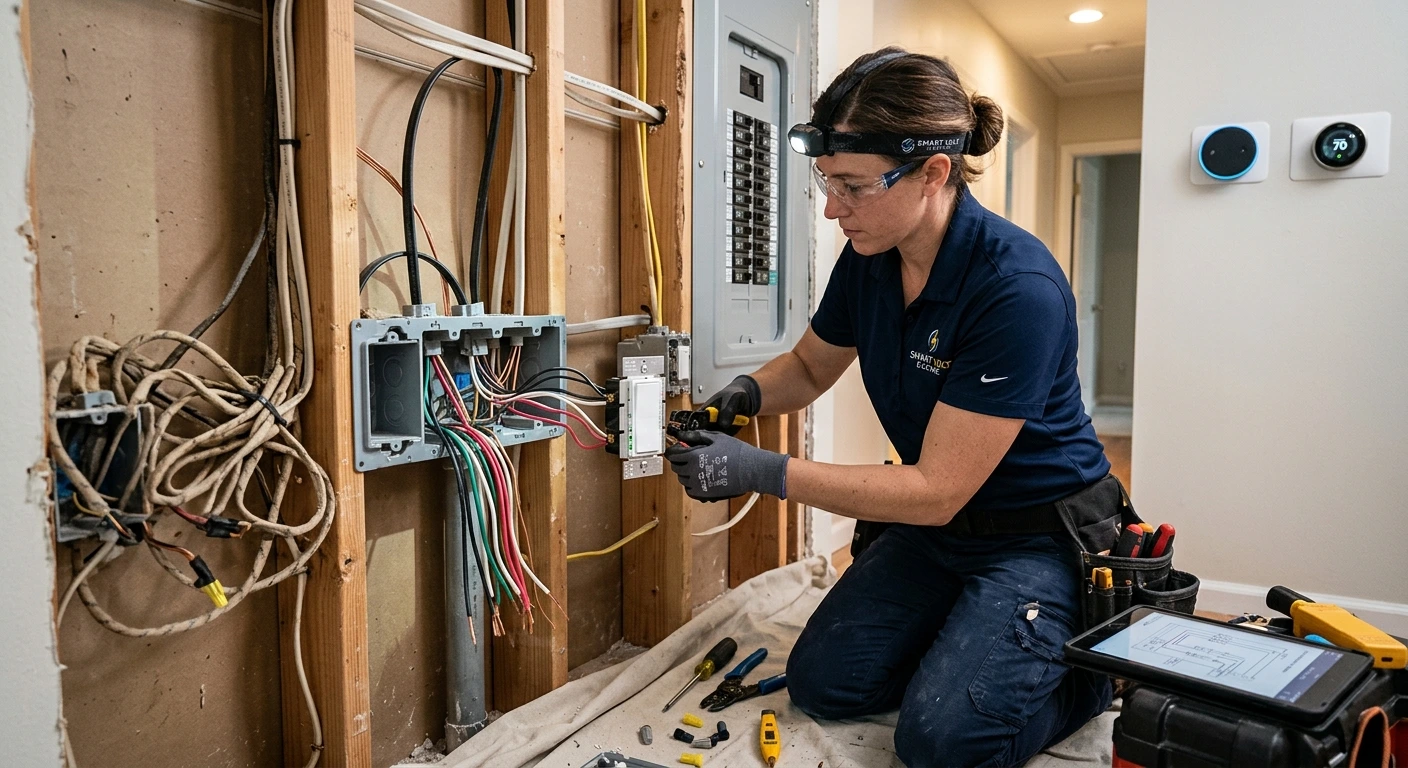
A neutral wire carries the return current back to the panel and provides the constant low-level power that a smart switch needs to keep its Wi-Fi radio, processor, and indicator LED running even when the light is off. In homes wired before the early 1990s, it was common practice to run only the hot and load wires to the switch box because traditional toggle switches did not need a neutral. The neutral existed in the circuit but stayed back at the junction box or the outlet, never pulled to the switch location.
We run into this on about half the smart switch installations we do in Central Florida homes built before 1995. The fix is straightforward but requires opening the wall to pull a neutral wire from the nearest junction box to the switch box. It is not a DIY project because it involves working inside a live circuit and fishing wire through finished walls. There are a handful of smart switches on the market that work without a neutral wire, but they tend to be limited in compatibility, can cause flickering with certain LED bulbs, and do not support the full feature set of their neutral-required counterparts.
Which Smart Devices Need Dedicated Circuits?
A dedicated circuit is a circuit that serves only one device or appliance, with its own breaker in the panel. Several smart home upgrades require them, either by code or because the device draws enough power that sharing a circuit creates problems.
EV charger (Level 2): 40 to 50 amp dedicated circuit, 240V. This is the single biggest electrical addition in most smart home projects. If the panel does not have enough capacity, a panel upgrade or load management system is required before the charger goes in.
Smart panel (Span, Leviton, Lumin): Replaces the entire main breaker panel. Requires a licensed electrician for installation and typically costs $4,000 to $6,500 installed. Provides circuit-level energy monitoring and remote control of every breaker.
Home office or media room: A dedicated 20-amp circuit prevents interference and voltage dips when HVAC or other large loads cycle on. Critical for anyone working from home on video calls or running a home theater.
Smart thermostat: Requires a C-wire (common wire) for continuous 24V power. Many older HVAC systems do not have a C-wire run to the thermostat location, which means either pulling a new wire or installing a C-wire adapter kit.
Outdoor smart devices: Smart landscape lighting controllers, security cameras, and outdoor speakers need weatherproof outlets on GFCI-protected circuits. Many older homes lack outdoor outlets entirely.
For a deeper look at what standby generators require from your panel, including transfer switch wiring and load calculations, see our Generac generator cost guide.
Does Your Panel Have Enough Capacity for Smart Home Upgrades?
Your electrical panel has a maximum amperage rating, typically 100, 150, or 200 amps for residential homes. Every circuit in the panel draws from that total. Adding smart home devices, especially an EV charger or a smart panel, can push a 100-amp panel past its safe operating limit.
The National Electrical Code requires that total connected load stay within 80% of the panel’s rated capacity. A 100-amp panel should not carry more than 80 amps of continuous load. A single Level 2 EV charger draws 40 amps continuously, which is half the safe capacity of a 100-amp panel before you account for air conditioning, cooking appliances, water heaters, and everything else the home already runs.
The most common issue we see homeowners run into is discovering they need a panel upgrade halfway through a smart home project. The EV charger is ordered, the wall connector is mounted, and then the electrician opens the panel and finds it is already at capacity. A 100-amp to 200-amp panel upgrade runs $1,800 to $3,500 in Central Florida, including the permit and inspection. Planning the panel assessment before purchasing devices avoids the delay and the surprise cost.
The best time to assess your panel capacity is before you buy the first smart device. Super Fast Electric performs panel evaluations and load calculations across Central Florida, so you know exactly what your home can handle and what needs upgrading first. Licensed Florida Master Electrician, 800+ five-star Google reviews, and a 100% satisfaction guarantee.
Why Surge Protection Comes Before Smart Devices
Every smart device in your home contains a microprocessor, a Wi-Fi radio, and in many cases a small transformer. These components are far more sensitive to voltage spikes than the incandescent bulbs, manual thermostats, and analog switches they replaced. A single lightning strike within a mile of your home can send a surge through the electrical system that damages or destroys every connected device simultaneously.
Central Florida is the lightning capital of the United States. We install whole-home surge protectors at the panel on nearly every smart home project we do, and we recommend them as the first upgrade before any smart devices go in. A whole-home surge protector costs $250 to $500 installed and protects every circuit in the panel. For high-value equipment like network racks, home theaters, and computers, we add point-of-use surge protection as a second layer. For more on how surge-related outlet failures present in the real world, see our guide on why outdoor outlets stop working.
Smart Home Upgrade Checklist
If you are planning a smart home project, do these steps in this order to avoid rework, wasted money, and devices that do not function as expected.
- Assess your panel capacity. Open the panel door and check the main breaker rating. If it reads 100A or 150A and you plan to add an EV charger, smart panel, or multiple dedicated circuits, budget for a panel upgrade first.
- Install whole-home surge protection. This protects every device you add from that point forward. Do it before the smart switches, not after.
- Check for neutral wires at every switch location where you plan to install smart switches. If neutrals are absent, plan for the wiring work as part of the project rather than discovering it mid-install.
- Run dedicated circuits for any high-draw devices: EV charger, home office, media room, outdoor entertainment areas. Pull the wire while walls are open if you are remodeling.
- Install the smart devices last: switches, dimmers, thermostats, outlets, cameras. The electrical infrastructure supports them, not the other way around.
- Test every device and confirm that GFCI and AFCI protection is in place on the circuits that require it under the current NEC and Florida Building Code.
Smart Home Upgrade Costs at a Glance
| Upgrade | Typical Cost (Installed) | Why It Matters |
|---|---|---|
| Smart switch (with neutral) | $75 to $150 per switch | App and voice control of lighting |
| Neutral wire retrofit | $150 to $300 per switch box | Required for most smart switches in older homes |
| Smart thermostat + C-wire | $200 to $400 | Continuous power for scheduling and remote control |
| Whole-home surge protector | $250 to $500 | Protects all smart devices from lightning and surges |
| Dedicated 20A circuit | $200 to $500 | Isolated power for home office or media room |
| EV charger circuit (50A, 240V) | $500 to $1,500 | Required before Level 2 charger installation |
| Panel upgrade (100A to 200A) | $1,800 to $3,500 | Capacity for EV charger, smart panel, future loads |
| Smart panel (Span, Leviton) | $4,000 to $6,500 | Circuit-level monitoring and remote breaker control |
Many of these upgrades also reduce your monthly electricity costs. Smart switches with scheduling, smart thermostats with occupancy detection, and LED upgrades all cut energy waste. For a full breakdown, see our guide on how to lower your electric bill.
Common Smart Home Electrical Mistakes
Buying devices before checking wiring: A $50 smart switch is worthless without a neutral wire. A $500 EV charger wall connector is a paperweight without a dedicated 50-amp circuit. Always verify the electrical requirements before purchasing.
Skipping the panel assessment: Adding devices one at a time feels manageable until the cumulative load exceeds panel capacity. A single load calculation before the project starts prevents the mid-project panel upgrade surprise.
Using plug-in surge protectors instead of whole-home protection: Power strip surge protectors help at the point of use, but they do not stop a surge from entering the panel and reaching devices on unprotected circuits. Whole-home protection at the panel is the baseline.
DIY wiring in switch boxes: Smart switches require precise wiring connections. Putting the hot and neutral on the wrong terminals is the single most common DIY mistake we see, and it can trip the breaker, damage the switch, or create a fire hazard.
Ignoring outdoor circuits: Smart outdoor lighting, cameras, and speakers need GFCI-protected, weatherproof outlets. Plugging outdoor smart devices into a non-GFCI outlet is both a code violation and a safety risk, especially in Florida’s storm climate.
Frequently Asked Questions
Do I need an electrician for smart home upgrades?
You need a licensed electrician for any work that involves opening the panel, running new wire, adding circuits, or modifying existing wiring. Smart device installation itself (mounting a smart switch on existing wiring) can be done by a homeowner, but verifying that the wiring supports the device is the critical step most people skip.
How do I know if my switches have a neutral wire?
Turn off the breaker, remove the switch plate, and look inside the box. If you see a white wire connected to the switch or bundled with other white wires in the back of the box, you have a neutral. If you only see two wires (one black, one that goes to the light), you likely do not. When in doubt, have an electrician verify.
How much does it cost to add a neutral wire for smart switches?
Retrofitting a neutral wire to a switch box typically costs $150 to $300 per location, depending on the distance from the nearest junction box and how accessible the wall cavity is. In homes with finished walls, the cost is higher because the wire must be fished through without opening drywall.
Can my 100-amp panel handle smart home upgrades?
It depends on what you are adding. Smart switches and a thermostat add negligible load. An EV charger, smart panel, or multiple dedicated circuits can exceed a 100-amp panel’s safe capacity. A load calculation tells you exactly where you stand before you commit to a project.
What is a smart electrical panel?
A smart panel such as the Span or Leviton replaces your traditional breaker panel and adds circuit-level energy monitoring, remote on/off control of individual breakers, and dynamic load management through a smartphone app. Smart panels cost $4,000 to $6,500 installed and can eliminate the need for a full panel upgrade by intelligently managing power distribution.
Do smart home upgrades increase home value?
Yes. According to multiple real estate surveys, homes with smart thermostats, smart lighting, and EV charging infrastructure sell faster and at higher prices than comparable homes without them. The electrical infrastructure behind those devices is what makes the value durable, because the next owner inherits a system that works rather than a collection of gadgets on inadequate wiring.
Is whole-home surge protection necessary for smart devices?
In Central Florida, it is not optional. Smart devices contain sensitive microprocessors that are far more vulnerable to voltage spikes than traditional electrical equipment. A single lightning-induced surge can destroy every connected device in the home simultaneously. Whole-home surge protection at the panel costs $250 to $500 and is the most cost-effective insurance for a smart home investment.
Next Steps
Start with a panel assessment and load calculation before purchasing any smart devices. This tells you whether your home’s electrical system can support the project as-is or needs upgrades first.
For smart lighting basics, see our guide on how smart light bulbs work. For energy savings from smart upgrades, see how to lower your electric bill.
Super Fast Electric serves 20 cities across Central Florida with licensed Master Electricians, transparent pricing, warranties up to 10 years, and a 100% satisfaction guarantee.
Smart home technology only works as well as the wiring behind it. Super Fast Electric handles panel assessments, neutral wire retrofits, dedicated circuits, surge protection, and every other electrical upgrade your smart home needs. Licensed Florida electrical contractor EC13013514, 20,000+ service calls completed, 800+ five-star Google reviews. Get a no-obligation quote for your smart home project.